
Building Agent Coding Arena: A Local Benchmark For Racing Coding Agents

Agent Coding Arena is a TypeScript application that races two coding-agent architectures against the same failing repository. One side is an explicit LangGraph.js state machine. The other side is LangChain's OSS Deep Agents harness. Both receive the same model, the same problem, and the same isolated workspace contract.
The goal is not to claim one framework is universally better. The goal is to make the differences visible. When two agents are fixing the same bug at the same time, you can see which one plans, which one inspects files, which one overuses tools, which one recovers from model quirks, and which one gets to green tests first.
Why Build This?
Most agent demos hide the interesting parts. You submit a task, wait, and receive a final answer. That is useful for products, but weak for learning. Developers need to see:
Which commands were run.
Which files were read.
Which files were written.
How many tool calls happened.
Whether the final tests passed.
How orchestration changes behavior when the model is held constant.
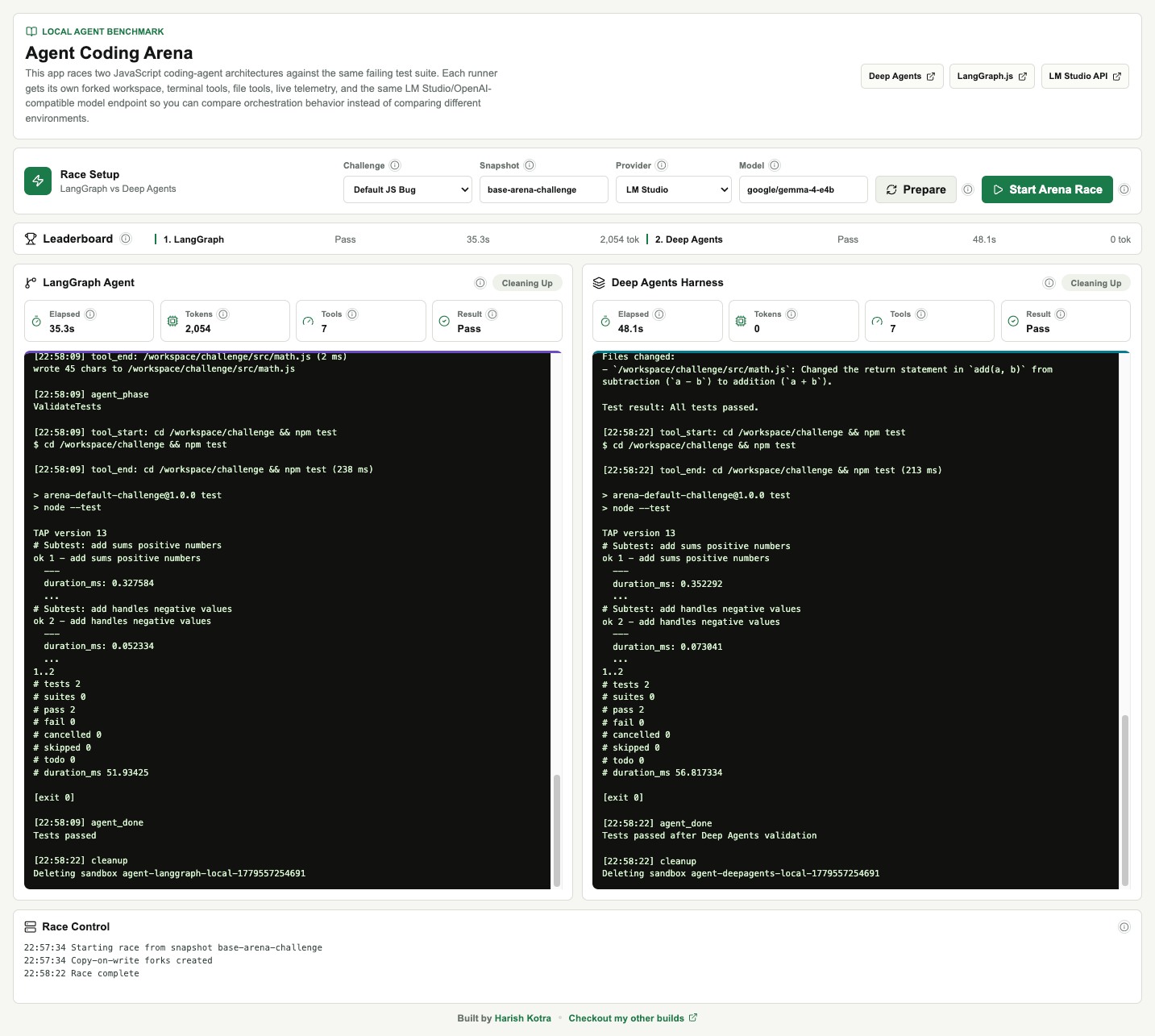
Agent Coding Arena makes those internals visible in a side-by-side terminal dashboard.
The Core Idea
Take a failing JavaScript repository, fork it into two identical workspaces, give each workspace to a different agent architecture, then stream the race live.

The default injected bug is intentionally small:
export function add(a, b) {
  return a - b;
}
The test suite expects addition:
import test from "node:test";
import assert from "node:assert/strict";
import { add } from "../src/math.js";

test("add sums positive numbers", () => {
  assert.equal(add(2, 3), 5);
});

test("add handles negative values", () => {
  assert.equal(add(-2, 3), 1);
});
Small challenges are valuable early because they expose orchestration overhead. A model should not need thirty tool calls to fix a - b. If it does, the harness behavior is worth inspecting.
Stack
The app uses:
Next.js App Router for the frontend and API routes.
React and TypeScript for the dashboard.
Server-Sent Events for live telemetry.
@langchain/langgraphfor the explicit graph-based competitor.deepagentsfor the harness competitor.@langchain/openaifor OpenAI-compatible model access.LM Studio as the default local inference server.
A local filesystem sandbox as the default execution environment.
Optional
langsmith/sandboxsupport for teams that have LangSmith Sandbox access.
The important design choice is that the inference layer is OpenAI-compatible. LM Studio, Featherless.ai, OpenAI, and custom endpoints can all be swapped without changing the agent code.
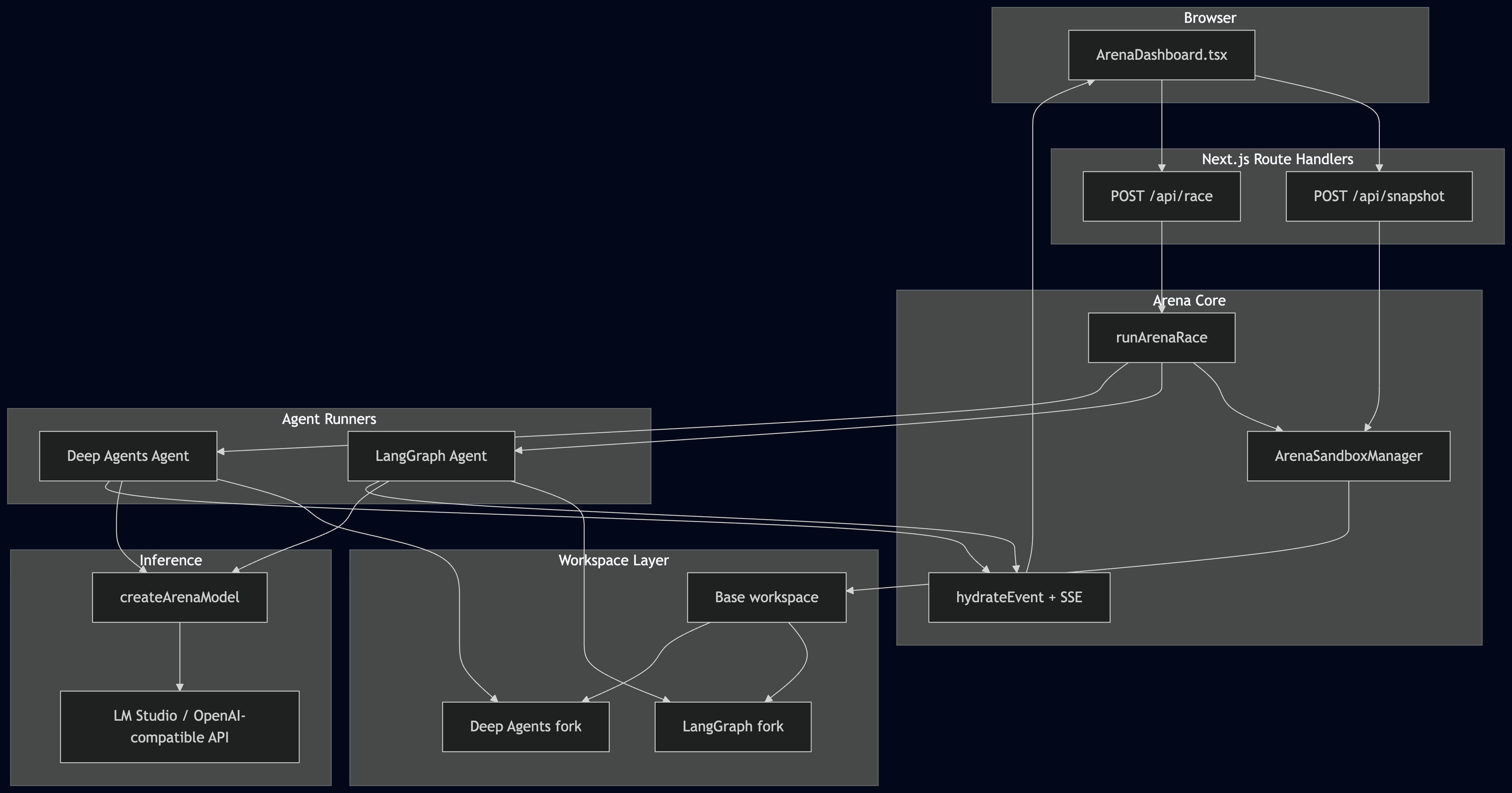
System Architecture
Snapshot And Forking
The sandbox manager owns the base snapshot lifecycle. In local mode, it creates a temporary workspace, injects or clones a challenge, installs dependencies, and captures a reusable snapshot. When the race starts, it creates two independent copies from that snapshot.
async spawnForks(snapshotName = defaultSnapshotName(), challengeRepoUrl?: string) {
  if (!this.shouldUseLangSmith()) {
    return this.spawnLocalForks(snapshotName, challengeRepoUrl);
  }

  const client = this.getLangSmithClient();
  const timestamp = Date.now();
  const [langGraphSandbox, deepAgentsSandbox] = await Promise.all([
    client.createSandbox({
      snapshotName,
      name: `agent-langgraph-${timestamp}`
    }),
    client.createSandbox({
      snapshotName,
      name: `agent-deepagents-${timestamp}`
    })
  ]);

  return { langGraphSandbox, deepAgentsSandbox };
}
The default path is local, not LangSmith. That matters because LangSmith Sandboxes can be a paid feature. The demo should work for developers who just want to experiment with local models and OSS agent frameworks.
Race Orchestration
The backend starts both agents concurrently and streams telemetry events as they run.
const agents = Promise.allSettled([
  runLangGraphEngineer({
    sandbox: forks.langGraphSandbox,
    emit,
    maxIterations,
    commandTimeoutMs,
    signal: controller.signal,
    provider: body.provider,
    model: body.model
  }),
  runDeepAgentsEngineer({
    sandbox: forks.deepAgentsSandbox,
    emit,
    maxIterations,
    commandTimeoutMs,
    signal: controller.signal,
    provider: body.provider,
    model: body.model
  })
]);
Cleanup is explicit:
finally {
  clearTimeout(timeout);

  if (forks) {
    await Promise.allSettled([
      cleanupSandbox(forks.langGraphSandbox, "langgraph", emit),
      cleanupSandbox(forks.deepAgentsSandbox, "deepagents", emit)
    ]);
  }
}
That is especially important when using remote execution environments. Even in local mode, it keeps temporary directories under control.
Competitor 1: LangGraph State Machine
The LangGraph competitor is intentionally explicit. It is not a generic ReAct loop.
This is the code-level shape:
const workflow = new StateGraph(ArenaGraphAnnotation)
  .addNode("Plan", planNode)
  .addNode("ExecuteCommand", executeCommandNode)
  .addNode("EditFile", editFileNode)
  .addNode("ValidateTests", validateTestsNode)
  .addEdge(START, "Plan")
  .addEdge("Plan", "ExecuteCommand")
  .addEdge("ExecuteCommand", "EditFile")
  .addEdge("EditFile", "ValidateTests")
  .addConditionalEdges("ValidateTests", routeAfterValidation);
This makes the tradeoff obvious. LangGraph gives you control and inspectability. The downside is that you must design the loop yourself.
Competitor 2: Deep Agents Harness
The Deep Agents competitor uses the OSS deepagents runtime. Instead of manually specifying every phase, the app gives Deep Agents a backend that supports file operations and command execution.
const backend = new ArenaDeepSandboxBackend(options.sandbox, options.commandTimeoutMs);

const agent = createDeepAgent({
  name: "deep-agents-engineer",
  model,
  backend,
  systemPrompt: [
    "You are the Deep Agents competitor in Agent Coding Arena.",
    "The repository root is /workspace/challenge.",
    "Run `cd /workspace/challenge && npm test` first.",
    "Fix the production code, then rerun tests until they pass."
  ].join("\n")
});
The backend adapts the arena sandbox to Deep Agents:
export class ArenaDeepSandboxBackend extends BaseSandbox {
  async execute(command: string): Promise<ExecuteResponse> {
    const result = await this.sandbox.run(command, {
      timeout: this.timeoutMs,
      timeoutMs: this.timeoutMs
    });

    return {
      output: compactSandboxOutputForModel(command, normalizeSandboxOutput(result)),
      exitCode: extractExitCode(result),
      truncated: false
    };
  }
}
This gives Deep Agents the tools it expects while keeping the execution environment identical to the LangGraph side.
Local Models And Tool Calling
The app defaults to LM Studio:
return new ChatOpenAI({
  model: resolved.model,
  apiKey: resolved.apiKey,
  temperature: 0.1,
  maxRetries: 1,
  timeout: 60_000,
  configuration: {
    baseURL: resolved.baseURL
  },
  streamUsage: true
});
For LM Studio:
AI_PROVIDER=lmstudio
LMSTUDIO_BASE_URL=http://localhost:1234/v1
LMSTUDIO_MODEL=google/gemma-4-e4b
LMSTUDIO_API_KEY=lm-studio
Local models are useful because there are no hosted inference black boxes. They also expose practical problems: tool schema drift, context limits, inconsistent usage metadata, and model-specific tool-call quality. The app includes compact tool output and small compatibility shims for those realities.
Typed Telemetry
The UI is powered by structured events rather than raw strings.
type ArenaTelemetryEvent = {
  id: string;
  at: number;
  type: ArenaEventType;
  agent?: "langgraph" | "deepagents";
  phase?: AgentPhase;
  message?: string;
  command?: string;
  path?: string;
  durationMs?: number;
  metrics?: AgentMetricsSnapshot;
};
The dashboard reduces those events into terminal logs:
function reduceAgentLogs(logs: AgentLogEntry[], event: ArenaTelemetryEvent): AgentLogEntry[] {
  if (!event.message) return logs;

  if (event.type === "llm_chunk") {
    return appendOrUpdateStreamingLog(logs, event);
  }

  if (event.type === "llm_end") {
    return finalizeStreamingLog(logs, event);
  }

  return appendLog(logs, {
    id: event.id,
    kind: "event",
    at: event.at,
    label: eventLabel(event.type, event.command, event.path),
    content: event.message,
    phase: event.phase,
    durationMs: event.durationMs
  });
}
This keeps the UI responsive and lets it show metrics, state badges, terminal output, and system events independently.
UI Design
The UI is a real-time terminal dashboard rather than a landing page. Users see:
Challenge and snapshot controls.
Provider and model controls.
A leaderboard.
LangGraph terminal output.
Deep Agents terminal output.
Live metrics for elapsed time, tokens, tool calls, and pass/fail result.
Race Control logs.
Info tooltips explaining what each control means.
The dashboard also links to Deep Agents, LangGraph.js, and LM Studio API docs so new users can understand what they are trying.
What I Learned
The most interesting part was not the bug fix. It was the harness behavior around the fix.
With local models, you quickly see that:{% embed %}
Context length and tool-call quality are separate problems.
Small models may understand the bug but call a tool with the wrong schema.
Long harness prompts can overflow unless tool output is compacted.
Explicit graphs are easier to reason about.
Deep harnesses provide more built-in behavior, but that behavior needs provider-specific tuning.
This is exactly why a visual benchmark is useful. It makes invisible agent decisions concrete.
Where To Take It Next
Good next features:
Add a strict mode that disables compatibility fallbacks.
Add more challenge templates.
Save race history to a database.
Replay previous runs from captured SSE logs.
Add model-vs-model races.
Add architecture-vs-architecture races.
Add Docker-based local sandboxes.
Add multi-language challenges.
Add LangSmith trace links when tracing is enabled.
Agent Coding Arena is a small app, but it captures a useful developer workflow: compare agents by watching them work. Same model, same challenge, same tools, isolated workspaces, live telemetry.
That is a better way to understand agent architecture than reading a final answer.
/youtub
Code & more: https://www.dailybuild.xyz/project/141-agent-coding-arena


